Web Load Test Aracı
Web siteleri için yazılmış Load test aracı. Adı da "oha" :]

Kurulum ubuntu için anlatılmıştır. Diğer işletim sistemleri üzerindeki kurulum için github yönergesini takip edin.
echo "deb http://packages.azlux.fr/debian/ buster main" | sudo tee /etc/apt/sources.list.d/azlux.listwget -qO - https://azlux.fr/repo.gpg.key | sudo apt-key add -apt update -y; apt install oha -y;Parametre açıklamalarını aşağıda bulabilirsiniz.
root@sezer:~# oha --help
oha 0.5.0

Ohayou(おはよう), HTTP load generator, inspired by rakyll/hey with tui animation.

USAGE:
    oha [FLAGS] [OPTIONS] <url>

ARGS:
    <URL>    Target URL.

OPTIONS:
    -n <N_REQUESTS>
            Number of requests to run. [default: 200]

    -c <N_WORKERS>
            Number of workers to run concurrently. You may should increase limit to number of open
            files for larger `-c`. [default: 50]

    -z <DURATION>
            Duration of application to send requests. If duration is specified, n is ignored.
            Examples: -z 10s -z 3m.

    -q <QUERY_PER_SECOND>
            Rate limit for all, in queries per second (QPS)

        --latency-correction
            Correct latency to avoid coordinated omission problem. It's ignored if -q is not set.

        --no-tui
            No realtime tui

        --fps <FPS>
            Frame per second for tui. [default: 16]

    -m, --method <METHOD>
            HTTP method [default: GET]

    -H <HEADERS>
            Custom HTTP header. Examples: -H "foo: bar"

    -t <TIMEOUT>
            Timeout for each request. Default to infinite.

    -A <ACCEPT_HEADER>
            HTTP Accept Header.

    -d <BODY_STRING>
            HTTP request body.

    -D <BODY_PATH>
            HTTP request body from file.

    -T <CONTENT_TYPE>
            Content-Type.

    -a <BASIC_AUTH>
            Basic authentication, username:password

        --http-version <HTTP_VERSION>
            HTTP version. Available values 0.9, 1.0, 1.1, 2.

        --host <HOST>
            HTTP Host header

        --disable-compression
            Disable compression.

    -r, --redirect <REDIRECT>
            Limit for number of Redirect. Set 0 for no redirection. [default: 10]

        --disable-keepalive
            Disable keep-alive, prevents re-use of TCP connections between different HTTP requests.

        --ipv6
            Lookup only ipv6.

        --ipv4
            Lookup only ipv4.

        --insecure
            Accept invalid certs.

        --connect-to <CONNECT_TO>
            Override DNS resolution and default port numbers with strings like
            'example.org:443:localhost:8443'

    -h, --help
            Print help information

    -V, --version
            Print version information
Şimdi test olarak rancher üzerinde kaldırdığımız demo web sitesine 1 dakika boyunda devam edecek istek gönderiyoruz.
oha -z 60s http://sezer.test
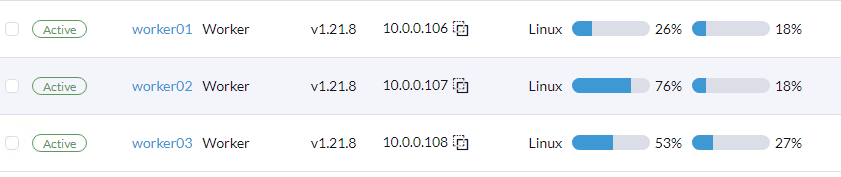
Workerların kaynak kullanımlarını takip edebilirsiniz Rancher üzerinden.